
Practical Guide on Handling Date and Time in Applications
Business in the front, party in the back.
This is a practical guide on handling dates and times in applications. Dates and times are a common source of bugs and confusion in software development. This guide provides best practices for storing, querying, and displaying dates and times in applications.
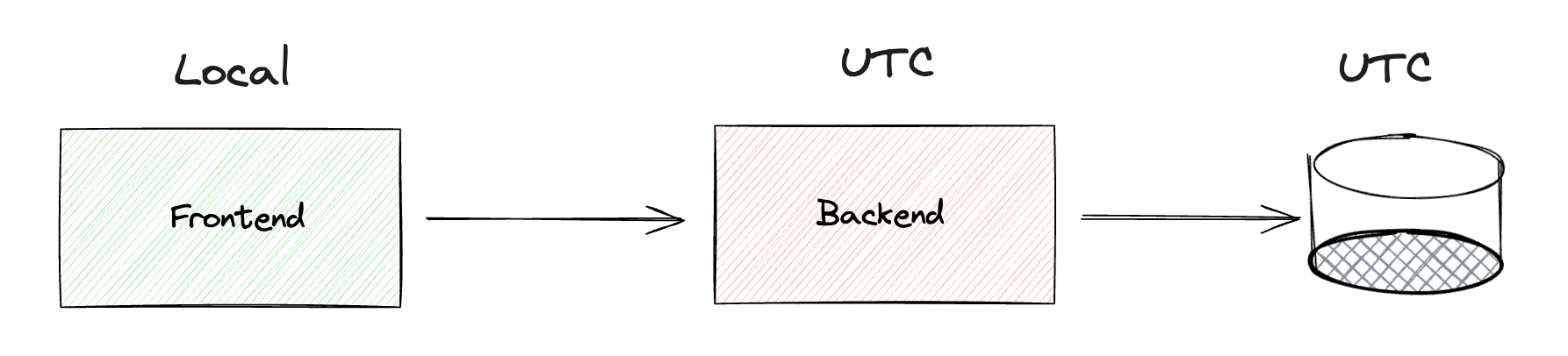
UTC
Coordinated Universal Time (UTC) is the standard time used in software development. It is the primary time standard by which the world regulates clocks and time. UTC is not affected by daylight saving time or time zones.
# Z for UTC
2023-11-03T14:30:00Z
2023-11-03T14:30:00+00:00

# New York time (EST: UTC-5, or EDT: UTC-4 during daylight saving)
2023-11-03T09:30:00-05:00  # Same moment as above, displayed in EST
Daylight Saving Time
Daylight saving time (DST) is the practice of setting the clock forward by one hour during the warmer months to extend evening daylight. DST can cause confusion and bugs in software applications.
Time Zones
Time zones are regions of the Earth that have the same standard time. Time zones are based on the Earth’s rotation and the position of the sun. Each time zone is typically one hour apart from its neighboring time zones.
Time zones have been changing over time due to political, social, and economic factors. It is important to consider historical time zone changes when working with dates and times.
Libraries
Due to the complexity of DST and time zones, it is recommended to use libraries that handle date and time operations.
UTC: APIs, data storage, and ensuring consistency across time zones
- Store the datetime in UTC in the DB
- UTC ensures consistency for accurate time-based queries and sorting.
- Use the
TIMESTAMP WITH TIME ZONE/TIMESTAMPTZdata type in databases to clearly indicate timezone awareness.
- Store the user’s timezone separately
- Provides timezone context for understanding the user’s local time at the moment of data storage, allowing you to display the time accurately according to the user’s original timezone.
- Usually this information is not required for all queries, but it can be useful for specific use cases.
CREATE TABLE user_data (
    id SERIAL PRIMARY KEY,
    event_time TIMESTAMP WITH TIME ZONE NOT NULL,  -- Stores UTC time
    user_timezone VARCHAR(50) NOT NULL             -- Stores timezone, e.g., "America/New_York"
);
from datetime import datetime
from zoneinfo import ZoneInfo

# Store event with UTC time and user's timezone
def store_event(cursor, user_timezone: str):
    event_time_utc = datetime.now(ZoneInfo("UTC"))
    cursor.execute(
        "INSERT INTO user_data (event_time, user_timezone) VALUES (%s, %s)",
        (event_time_utc, user_timezone)
    )

# Retrieve and convert to user's original timezone
def get_event_in_user_timezone(cursor, event_id: int):
    cursor.execute(
        "SELECT event_time, user_timezone FROM user_data WHERE id = %s",
        (event_id,)
    )
    result = cursor.fetchone()
    if not result:
        return None

    event_time_utc, user_timezone = result

    # Convert UTC to user's timezone
    user_tz = ZoneInfo(user_timezone)
    local_time = event_time_utc.astimezone(user_tz)

    return {
        "utc_time": event_time_utc.isoformat(),
        "local_time": local_time.isoformat(),
        "timezone": user_timezone
    }

# Example usage
# result = get_event_in_user_timezone(cursor, 123)
# Returns: {
#   "utc_time": "2024-03-01T14:30:00+00:00",
#   "local_time": "2024-03-01T09:30:00-05:00",
#   "timezone": "America/New_York"
# }
Local time: Frontend
The frontend should receive the time in UTC and convert it to the user’s local timezone. Optionally, the API can send the original timezone with the data if this information is required.
- Consistency and Simplicity
- By sending all times in UTC, you establish a consistent, universal standard for timestamps across the application.
- Timezone Awareness on the Frontend
- The frontend has direct access to the user’s current timezone through the browser.
- Adaptability to User Settings
- Some applications allow users to choose a preferred timezone for displayed timestamps.
Frontend Example with TypeScript
// In this example user is in New York timezone (EST)

// Receive UTC from API and display in user's local timezone
const utcTime = "2024-03-01T14:30:00Z";  // From API
const localTime = new Date(utcTime).toLocaleString();  // "3/1/2024, 9:30:00 AM" (EST)

// Send user's local datetime to backend as UTC
const localDateTime = new Date();  // User's current local time: "2024-03-01 09:30 EST"
await fetch('/api/events', {
  body: JSON.stringify({
    eventTime: localDateTime.toISOString()  // Converts to UTC: "2024-03-01T14:30:00.000Z"
  })
});
Querying dates and ranges from the backend
If unsure about the timezone, convert first to UTC
my_date.astimezone(timezone.utc)
Should Frontend or Backend Handle Timezone Conversion?
- Backend
- Centralized handling of timezones.
- Consistent conversion across the application.
- Less complexity on the frontend.
- Frontend
- Direct access to the user’s timezone.
- Real-time conversion based on the user’s current location.
- Less load on the backend.
Should the frontend send dates in UTC or local time?
- Sending dates in UTC ensures consistency across the application.
- If the frontend sends dates in local time, the backend must convert them to UTC for accurate storage and querying.
Recommended pattern:
- User selects a date range on the frontend (e.g., January 1st to January 7th in their local timezone).
- The frontend converts the selected range to UTC before sending the request.
- The backend processes the request using the UTC range and returns data.
- The frontend converts any returned dates from UTC to the user’s local timezone for display.
By adhering to this pattern, you ensure consistency and minimize timezone-related issues.
UTC Conversion Error Example
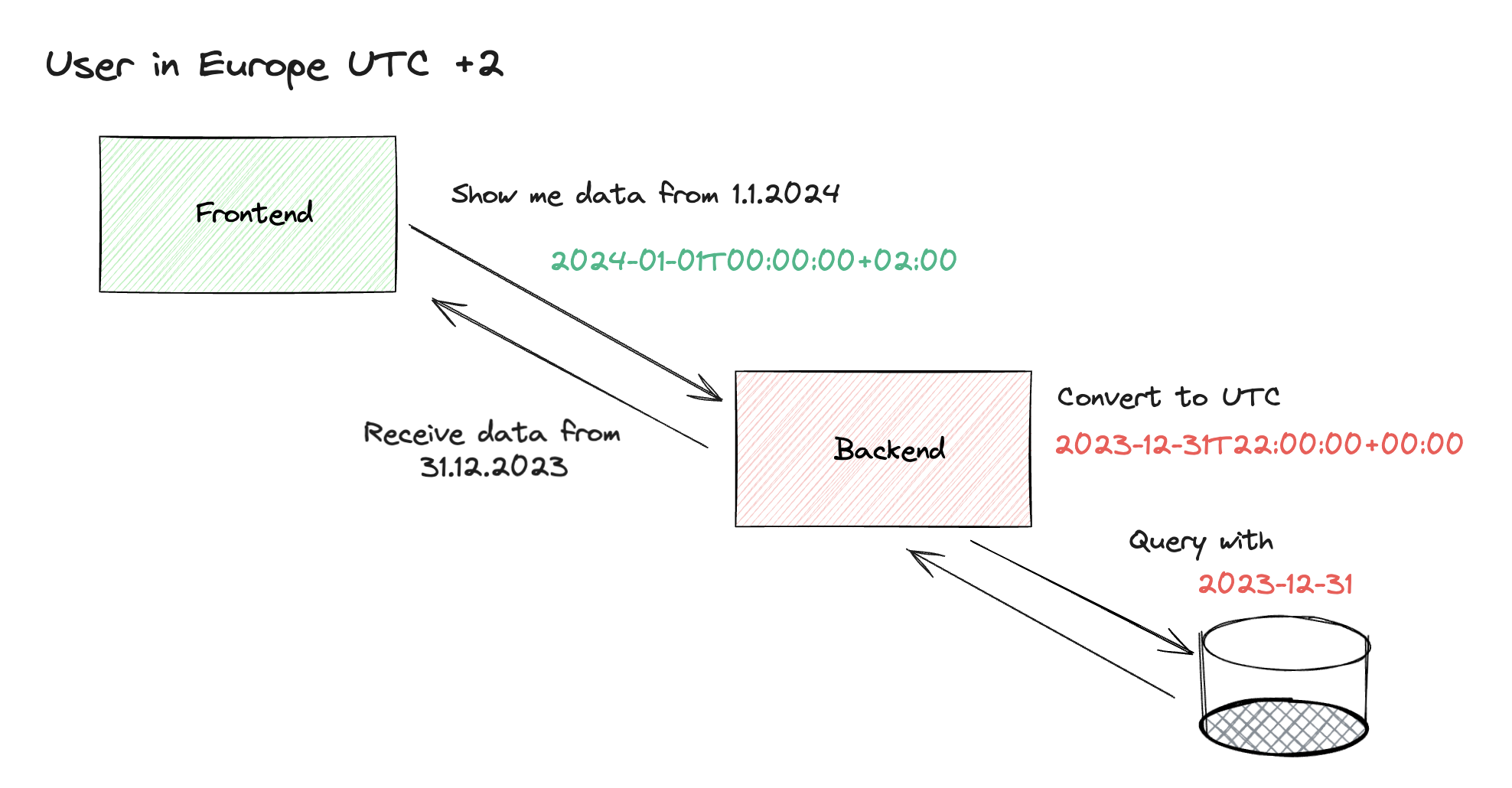
A common error occurs when querying data for a date range (e.g., from the beginning of January 1st to the end of January 7th). If the backend expects UTC but the frontend sends local time, the query will return incorrect results after timezone conversion. In these cases, it is better to use date-only types without time information, such as Python’s date class or C#’s DateOnly struct.
// User selects: "Show me data for January 1st"
// User is in Helsinki (UTC+2)

// Frontend sends start of day in local time
const startDateFromFrontend = new Date("2024-01-01T00:00:00+02:00");  // Jan 1 00:00 EET (UTC+2)
const startDate = startDateFromFrontend.toISOString();  // Converts to: "2023-12-31T22:00:00Z"

// Backend converts to start of that day and uses it for queries:
const beginningOfDate = startDate.setHours(0, 0, 0, 0);

// WHERE event_time >= '2023-12-31T00:00:00Z'  (start of Jan 1 in Helsinki)
Recommended patterns for sending dates to the backend
- It is recommended to send dates in UTC
{ "eventTime": "2024-03-01T14:30:00Z" } - Sending dates in local time with timezone awareness
{ "eventTime": "2024-03-01T09:30:00-05:00" } -
Sending dates in local time without timezone awareness, plus timezone information ```json { “eventTime”: “2024-03-01T09:30:00”, “timezone”: “America/New_York” }
- Sending only a date without time if supported by the API
{
  "eventDate": "2024-03-01"
}
If a codebase has extensive datetime handling, it might be beneficial to introduce helper functions and custom types to ensure all datetime objects are in UTC and avoid common mistakes.
from datetime import datetime, timezone
from typing import NewType

def ensure_utc(dt: datetime) -> datetime:
    """Convert any datetime to UTC. Raises error if naive datetime is passed."""
    if dt.tzinfo is None:
        raise ValueError("Naive datetime not allowed. Use datetime.now(timezone.utc) instead.")
    return dt.astimezone(timezone.utc)

# Define a custom type for UTC datetimes
UTCDateTime = NewType('UTCDateTime', datetime)

def make_utc_datetime(dt: datetime) -> UTCDateTime:
    """Create a UTC datetime with type checking."""
    return UTCDateTime(ensure_utc(dt))

# Usage - always create timezone-aware datetimes
dt = datetime.now(timezone.utc)  # timezone-aware UTC datetime
utc_dt = make_utc_datetime(dt)
Common Pitfalls
- Storing naive datetimes
- Using local time in databases
- Not handling DST transitions
- Comparing times across timezones without normalization
- Off-by-one errors with date ranges
Checklist
- DB
- Always store datetimes in UTC
- Store user’s timezone separately if needed for specific use cases
- Backend
- Use UTC for all internal operations (storage, queries, comparison, sorting)
- Always send datetimes to frontend in UTC
- Validate and convert incoming datetimes from frontend to UTC
- Accept timezone-aware formats when necessary
- Frontend
- Prefer sending datetimes to backend in UTC (recommended)
- Alternatively, send timezone-aware local times (with offset or timezone field)
- Always receive datetimes from backend in UTC
- Convert datetimes to local time for display